This review contains affiliate links. We may earn a commission at no extra cost to you.
UAG Plasma XTE iPhone 18 Pro Max Case Review
A nice rugged-looking case with a stand built in and a clear back. It gives you kind of the best of both worlds, and I think it's a great case design.
Buy the UAG Plasma XTE Case → $79.99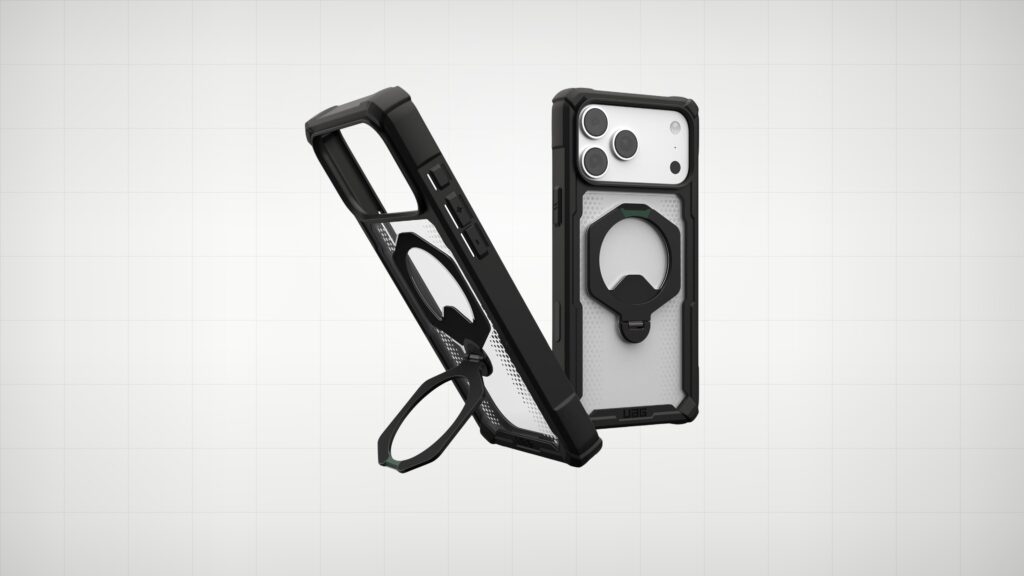
What We Like
- Built-in stand that goes back and forth and works at any angle you set it at
- The stand doubles as a little support on your finger when you're reading or scrolling
- Clear back lets a little bit of your iPhone's color pop through without being a completely clear case
- Lots of corner protection all the way around, and the corners are reinforced
- Very responsive integrated buttons, plus a camera control cutout with ridges that guide your finger
- MagSafe holds on when you shake the phone around, and the stand is magnetic as well
What Could Improve
- With the black 18 Pro Max, it doesn't look like you can see much color through the back, but in the right light you definitely can
Video Review
The Plasma XTE from UAG is a nice rugged-looking case that also has a stand built in. It’s one of the 17 cases I tested for the iPhone 18 Pro Max, and I had it on the black 18 Pro Max.
This case is relatively the same as the Plasma XTE for the 17 Pro Max. UAG didn’t really change a whole lot, and I like that. I used that version here and there on my 17 Pro Max, when I wanted something that was a little bit more rugged and added a little bit more protection in the corners.
The Built-In Stand
The stand does not rotate, but it does go back and forth, so you can adjust your angles, and of course it works at any angle you set it at. Even though it doesn’t spin, the way UAG shaped it makes it really easy to get different heights and different angles of the phone, depending on which orientation you have it in. I think it’s a great design.
One of the things I like to do when I’m reading for a long period of time, or scrolling the internet, is use the stand on the back as a little bit of support. It just kind of sits on the back of my finger, so I can hold the phone loosely and still feel like I’m securely holding it and I’m not going to drop it. Having that on the back of the case is a really nice option.
Clear Back and Design
One of the things I really like about this case is that it has a clear back without being a completely clear case. Depending on the color of your phone, you can see a little bit of that color pop through. With the black 18 Pro Max, it doesn’t look like you can see much, but in the right light, you definitely can. If you got one of the other colors the 18 Pro Max came in this year, you’re going to see that.
I also like the subtle orange accent, with the rest of the case being relatively dark in tone.
Buttons and Camera Control
The integrated buttons are very responsive. For camera control, UAG opted for just a cutout, so you just reach in there. The ridges of the case really just kind of guide your finger back and forth as you go through the different camera control modes. It doesn’t have an integrated button, just a straight cutout so you can access the camera control button, and there are no issues there.
Protection and MagSafe
There’s lots of corner protection on this case all the way around, and the corners are reinforced. It also sits nice and flat with no wobble.
I checked it for MagSafe, and the stand is magnetic as well. I can shake the phone around and it’s not going to come falling off.
Who the UAG Plasma XTE Is For
Overall, I think it’s a great case design, because it gives you kind of the best of both worlds. You have a more rugged design around the outer edges, and you can still see the color of your iPhone. If you want both, plus a stand built in, this is a great case from UAG that they continue to make.
Final Verdict
Was this helpful?
Frequently Asked Questions
Is the UAG Plasma XTE a good case for the iPhone 18 Pro Max?
Does the stand on the UAG Plasma XTE rotate?
Is the UAG Plasma XTE MagSafe compatible?
How protective is the UAG Plasma XTE for the iPhone 18 Pro Max?
Does the UAG Plasma XTE have a camera control button?
