Best iPad Pro M5 Accessories for a True Laptop Replacement Setup
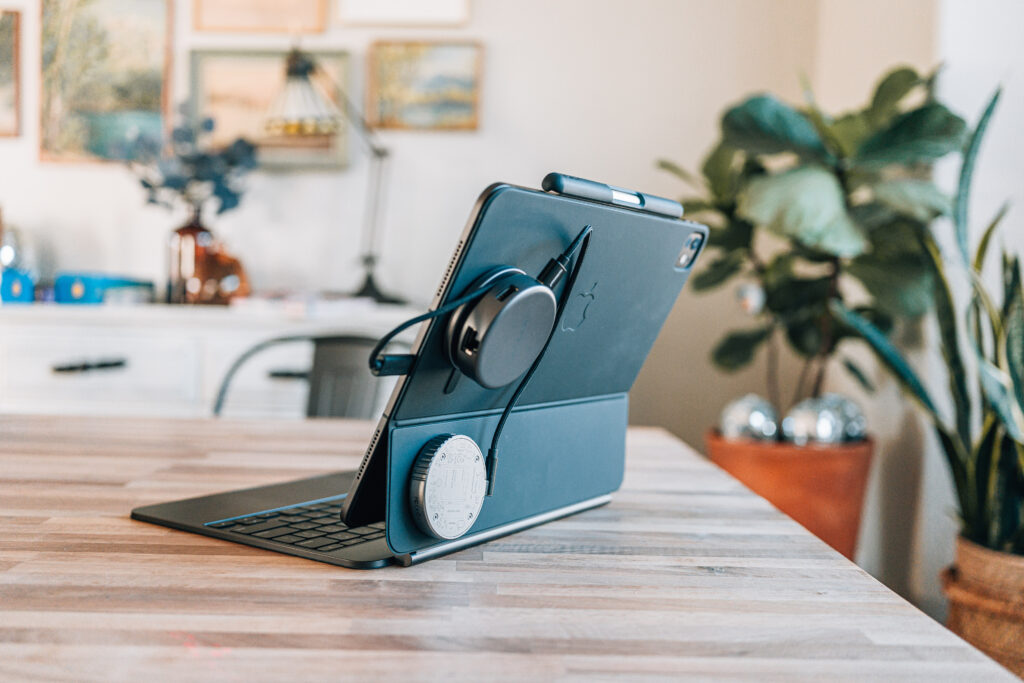
By • Last updated April 9, 2026
Best iPad Pro M5 Accessories for a True Laptop Replacement Setup

Editor's Picks
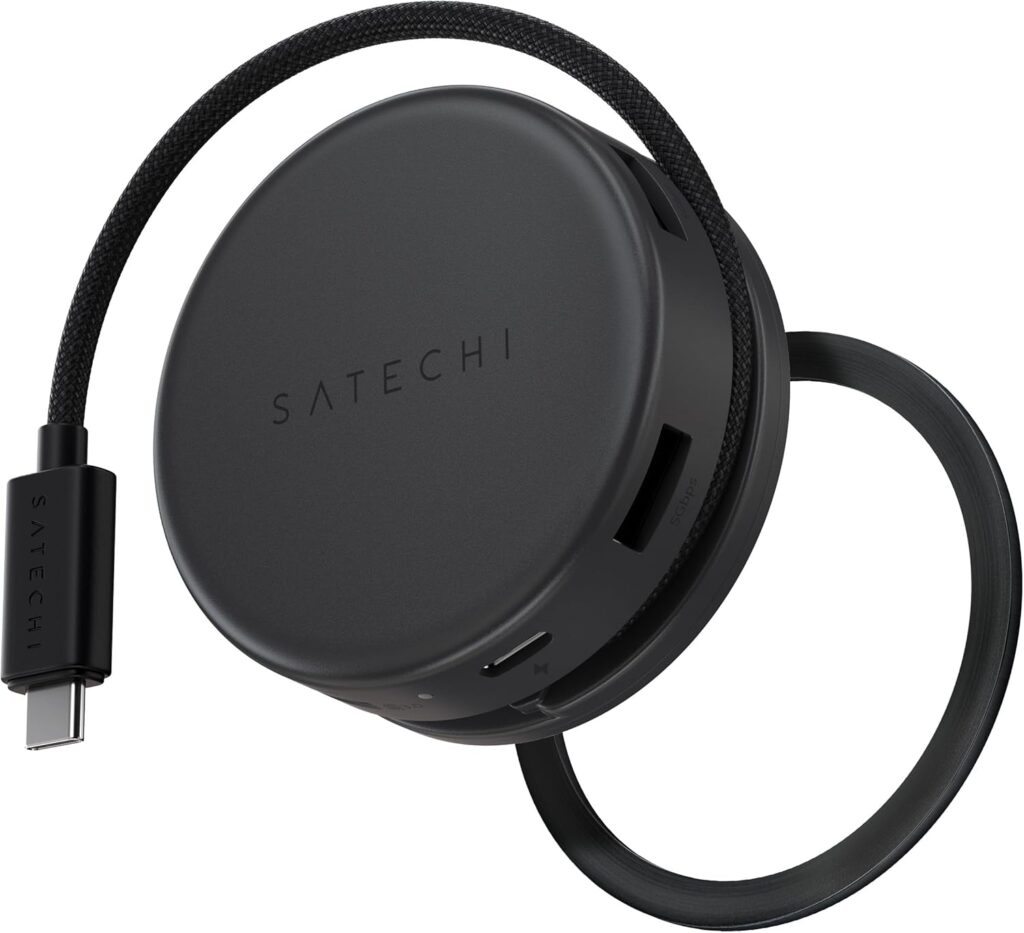
Satechi On-The-Go Multiport Adapter
Editor's Pick Best USB-C Hub

Satechi On-The-Go Multiport Adapter

A MagSafe-compatible hub that attaches to the back of your iPad with the included magnetic stickers. Features USB-C, dual USB-A, Ethernet, HDMI, and SD/microSD card slots with a built-in cable that tucks away when not in use. This is the hub that makes a true laptop-replacement setup possible.
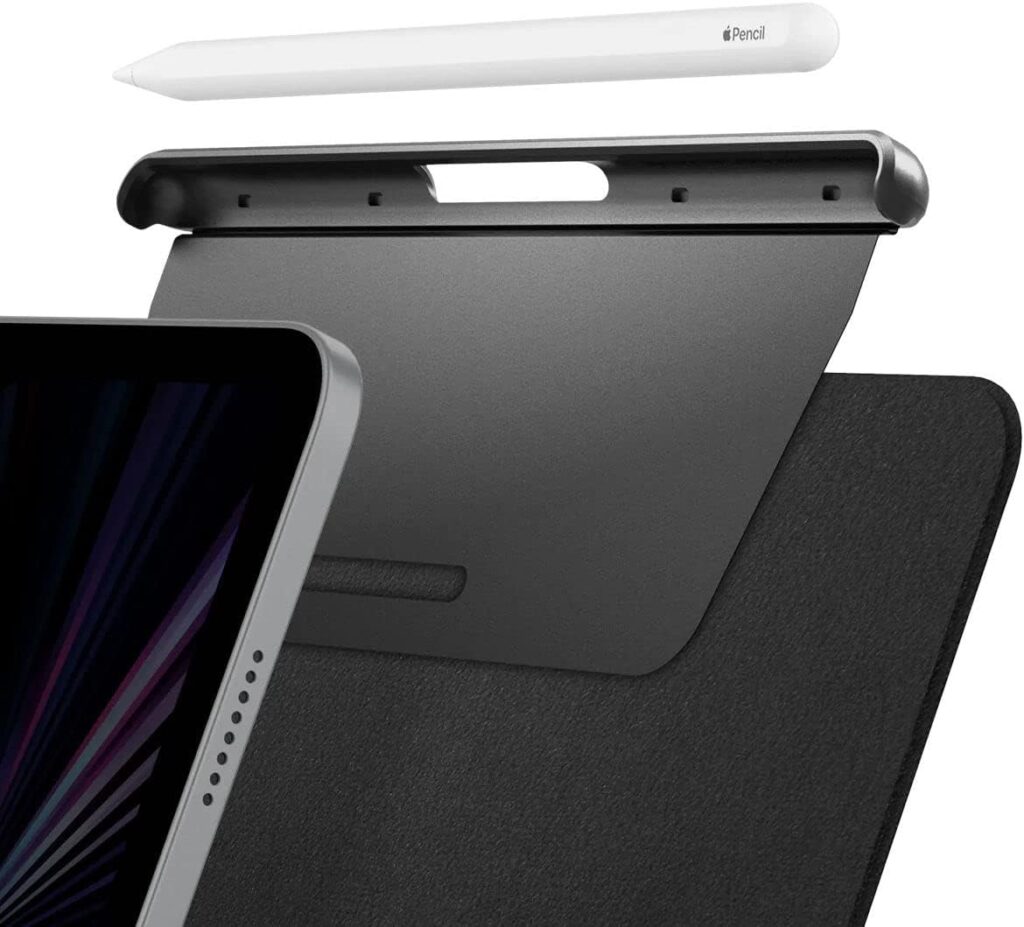
Spigen Apple Pencil Holder for Magic Keyboard
Editor's Pick Best Pencil Protection

Spigen Apple Pencil Holder for Magic Keyboard

A slim attachment that sits between your iPad and Magic Keyboard case, with built-in magnets that provide extra security for your Apple Pencil. A small cutout lets you pop the pencil out easily. Essential protection against losing your $130 stylus.

Keyboard & Input
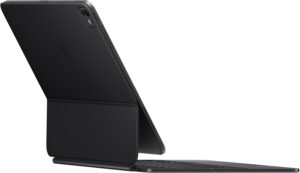
Apple Magic Keyboard Case (13-inch iPad Pro M4/M5)
Best Keyboard Case

Apple Magic Keyboard Case (13-inch iPad Pro M4/M5)

The best keyboard case available for iPad Pro. The updated version features a significantly larger trackpad and a full function row for media and brightness controls. It's sturdy, responsive, and transforms your iPad into something that genuinely feels like a laptop.
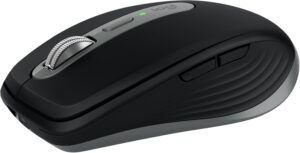
Logitech MX Anywhere 3S Mouse
Best Mouse

Logitech MX Anywhere 3S Mouse

A compact, precision mouse that pairs instantly via Bluetooth and tracks on virtually any surface. The electromagnetic scroll wheel is perfect for scrubbing through timelines and documents. I use the same mouse with my MacBook Pro, and the consistency across devices makes switching seamless.

Hubs & Connectivity
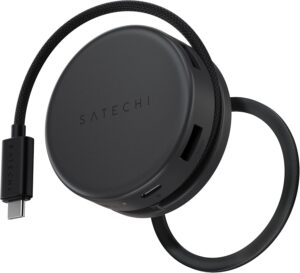
Satechi On-The-Go Multiport Adapter
Best USB-C Hub Editor's Pick

Satechi On-The-Go Multiport Adapter

A MagSafe-compatible hub that attaches to the back of your iPad with the included magnetic stickers. Features USB-C, dual USB-A, Ethernet, HDMI, and SD/microSD card slots with a built-in cable that tucks away when not in use. This is the hub that makes a true laptop-replacement setup possible.
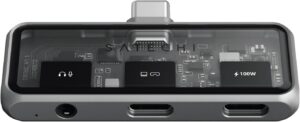
Satechi USB-C Multiport Adapter
Most Compact

Satechi USB-C Multiport Adapter

A tiny dongle that provides two USB-C ports (one with 100W passthrough charging) and a headphone jack. No cables required—just plug it into your iPad's USB-C port. It's the backup hub that lives permanently in my bag for emergencies.
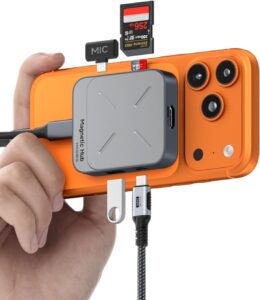
Hagibis Magnetic USB-C Hub
Best Budget Hub

Hagibis Magnetic USB-C Hub

A budget-friendly alternative with MagSafe-style mounting. Includes USB-C, USB-A, headphone jack, and SD/microSD card slots. If you don't need Ethernet or HDMI, this delivers solid functionality at a lower price point.
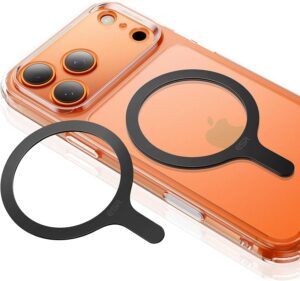
MagSafe Magnetic Sticker (2-Pack)
Essential Add-On

MagSafe Magnetic Sticker (2-Pack)

These adhesive magnetic rings attach to the back of your Magic Keyboard case, enabling MagSafe-compatible accessories to mount directly to your iPad. Essential for the hub and storage mounting system that makes this whole setup work.

Storage
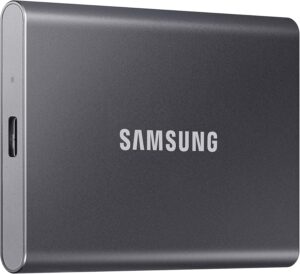
Samsung T7 Portable SSD (2TB)
Best External SSD

Samsung T7 Portable SSD (2TB)

Fast, reliable external storage in a compact form factor. Essential for working with large photo libraries and video files on iPad Pro. The read/write speeds keep up with demanding workflows without bottlenecking your productivity.
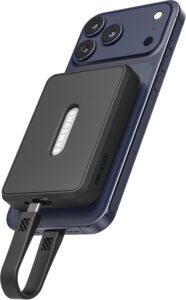
MagSafe Case for Samsung T7 SSD
Best SSD Accessory

MagSafe Case for Samsung T7 SSD

A silicone case with built-in MagSafe magnets that lets you mount your Samsung T7 directly to the back of your iPad. Combined with the magnetic stickers, your external storage stays attached and organized instead of dangling by a cable.

Protection & Cases
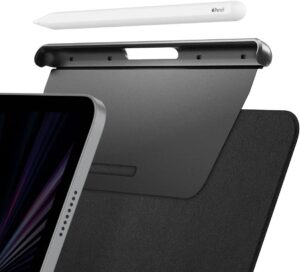
Spigen Apple Pencil Holder for Magic Keyboard
Best Pencil Protection Editor's Pick

Spigen Apple Pencil Holder for Magic Keyboard

A slim attachment that sits between your iPad and Magic Keyboard case, with built-in magnets that provide extra security for your Apple Pencil. A small cutout lets you pop the pencil out easily. Essential protection against losing your $130 stylus.
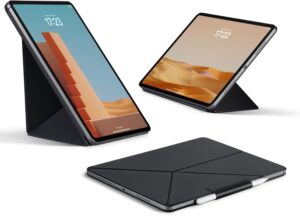
Pitaka Slim Case for iPad Pro M5 13-inch
Best Slim Case

Pitaka Slim Case for iPad Pro M5 13-inch

An ultra-thin folio case for when you don't need the full keyboard setup. Provides basic screen and back protection with a magnetic flap for the Apple Pencil and a built-in stand for multiple viewing angles. Perfect for media consumption and casual use.

Power
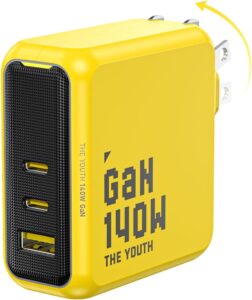
AOHI 140W GaN USB-C Charger
Best Charger

AOHI 140W GaN USB-C Charger

A 140W charger with two USB-C ports and one USB-A port that can power your iPad Pro, MacBook Pro, or any USB-C device at full speed. Despite the high wattage, it's smaller than Apple's 96W charger. The only travel charger you need.

Why These Accessories Made the Cut

After spending a year with the 11-inch iPad Pro M4, I found myself barely using it for real work. Media consumption? Sure. Responding to emails? Occasionally. But actual productivity—web design, photo editing in Lightroom, managing my online marketing business—the smaller screen just couldn’t cut it. So I upgraded to the 13-inch iPad Pro M5 and committed to making it a genuine laptop replacement.

The iPad Pro hardware is exceptional, but out of the box, it’s missing the inputs, outputs, and ergonomic flexibility that make a laptop practical for daily work. These are the accessories that bridge that gap. Every item on this list is something I actually use—not theoretical recommendations, but gear that’s proven itself in my daily workflow over weeks of real use.

My criteria were simple: each accessory had to solve a specific problem, be worth the investment, and not add unnecessary bulk or complexity. I tested cheaper alternatives, returned the ones that didn’t hold up, and kept the gear that actually earned a permanent spot in my bag.

Keyboard and Input

The foundation of any laptop-replacement setup is how you type and navigate. Apple’s Magic Keyboard case remains the gold standard here, and the updated version for the M4/M5 iPad Pro makes a compelling case even stronger. The trackpad is now significantly larger—nearly MacBook-sized—and the addition of a full function row means you can control brightness, volume, and media playback without hunting through Control Center.

But a trackpad alone doesn’t give you the precision control you need for detailed work. When I’m editing photos in Lightroom or doing fine-grained design work, I want a mouse. The Logitech MX Anywhere 3S connects instantly via Bluetooth, tracks on virtually any surface, and the scroll wheel’s electromagnetic precision makes scrubbing through timelines or large documents effortless. It’s the same mouse I use with my MacBook Pro, and having that consistency across devices matters more than you’d think.

Expanding Connectivity

The iPad Pro’s single USB-C port is its biggest limitation for professional use. You need charging, external storage, and potentially a display connection—all at once. I’ve tested three different hub solutions, and each serves a different purpose in my setup.

The Satechi USB-C Multiport Adapter is my emergency backup—a tiny dongle that lives permanently in my bag. It gives you two USB-C ports (one supporting 100W passthrough charging) and a headphone jack. No cables to manage, no setup required. The tradeoff is that it hangs off the side of your iPad, which puts some strain on the port and creates cable clutter. But when you’ve forgotten everything else, this little adapter saves the day.

The Satechi On-The-Go Multiport Adapter is my primary hub and the centerpiece of this setup. It’s MagSafe-compatible, so it attaches directly to the back of the iPad (with the help of magnetic stickers). The built-in cable tucks away when not in use and deploys when you need it. You get USB-C, dual USB-A, Ethernet, HDMI, and SD/microSD card slots—everything a professional needs. The magnetic mounting means the hub moves with your iPad instead of dangling off the side, and it works equally well on my iPhone or MacBook when I need it there.

The Hagibis Magnetic USB-C Hub offers similar MagSafe-style mounting at a lower price point. It includes USB-C, USB-A, a headphone jack, and SD/microSD slots. If you don’t need Ethernet or HDMI and want to save some money, this is a solid alternative. I keep it as a backup and occasionally use it on my iPhone.

Storage and File Management

Working with large photo libraries and video files means external storage isn’t optional—it’s essential. The Samsung T7 SSD delivers fast, reliable storage in a compact package, and pairing it with a MagSafe-compatible enclosure case transforms it into something you can mount directly to the back of your iPad alongside your hub.

This magnetic mounting system is what makes the whole setup work. I added MagSafe magnetic stickers to the back of the Magic Keyboard case, which lets me attach the Satechi hub, the Samsung T7 in its case, or even my Plaud Note recorder depending on what the day requires. The flexibility to reconfigure on the fly—without cables dangling or accessories sliding around—is a game changer.

Protecting the Apple Pencil

The Apple Pencil Pro magnetically attaches to the top of the iPad, which is convenient until you realize how easily it detaches. One bump, one careless toss into a bag, and your $130 stylus is gone. Yes, it has Find My, but that only helps if you can get back to where you dropped it.

The Spigen Apple Pencil Holder solves this elegantly. It’s a slim piece that sits between your iPad and the Magic Keyboard case, with built-in magnets that provide extra grip on the Apple Pencil. A small cutout lets you pop the pencil out easily when you need it. It’s one of those accessories you don’t think about until you’ve lost a Pencil—then it becomes essential.

Power

The AOHI 140W GaN charger is overkill for the iPad Pro alone, but that’s the point. It can charge my iPad, MacBook Pro, or any USB-C device I own at full speed. Three ports—two USB-C and one USB-A—mean I can charge multiple devices simultaneously. Despite the 140W output, it’s smaller than Apple’s 96W MacBook charger. This is the one charger I travel with, and it handles everything.

When You Don’t Need the Full Setup

Not every moment calls for laptop-replacement mode. Sometimes I just want to read, watch something, or browse without the bulk of the Magic Keyboard. The Pitaka Slim Case is my go-to for these situations. It’s incredibly thin and light, provides basic screen and back protection, and includes a magnetic flap that covers the Apple Pencil. The built-in stand works at multiple angles for comfortable viewing.

The tradeoff is minimal edge protection—this isn’t a case for clumsy moments. But for media consumption and casual use, the weight savings are worth it. I swap between the Magic Keyboard setup and the Pitaka case depending on what the day looks like.

The Bottom Line

This accessory stack transformed my iPad Pro M5 from a premium tablet into a legitimate laptop replacement. The key is the MagSafe mounting system—being able to attach hubs and storage directly to the back of the device keeps everything organized and portable. Add a proper keyboard, a precision mouse, and enough charging power to handle anything, and you’ve got a setup that can genuinely replace a MacBook for many workflows.

Is it for everyone? No. If you need macOS-specific apps or heavy multitasking with dozens of windows, stick with a laptop. But for web design, photo editing, content creation, email, and most professional tasks, this iPad Pro setup handles everything I throw at it—and it’s lighter and more flexible than lugging around a MacBook.

Was this helpful?

Frequently Asked Questions

What are the best accessories for using iPad Pro as a laptop replacement?

The essential accessories for using an iPad Pro as a laptop replacement are Apple's Magic Keyboard case for typing and trackpad input, a USB-C hub like the Satechi On-The-Go Multiport Adapter for expanded connectivity, external storage like the Samsung T7 SSD for file management, and a high-wattage charger like the AOHI 140W GaN charger. Adding MagSafe magnetic stickers to mount your hub and storage to the back of the iPad keeps everything organized and portable.

What is the best USB-C hub for iPad Pro?

The Satechi On-The-Go Multiport Adapter is the best USB-C hub for iPad Pro because it offers MagSafe-compatible mounting, a comprehensive port selection including USB-C, dual USB-A, Ethernet, HDMI, and SD card slots, plus a built-in cable that tucks away when not in use. For a budget alternative, the Hagibis Magnetic USB-C Hub offers similar magnetic mounting with fewer ports at a lower price point.

Is the Apple Magic Keyboard worth it for iPad Pro?

Yes, the Apple Magic Keyboard is worth it for iPad Pro if you plan to use your iPad for serious productivity work. The updated version for M4/M5 iPad Pro features a significantly larger trackpad and a full function row for media controls. It's the sturdiest, most responsive keyboard option available and transforms the iPad into something that genuinely feels like a laptop. The high price is justified if you're replacing a laptop workflow.

How do I add more ports to my iPad Pro?

You can add more ports to your iPad Pro using a USB-C hub or dock. The Satechi On-The-Go Multiport Adapter provides USB-C, USB-A, HDMI, Ethernet, and SD card slots in a MagSafe-mountable package. For a compact emergency option, the Satechi USB-C Multiport Adapter is a small dongle with two USB-C ports and a headphone jack. Both options support passthrough charging so you can power your iPad while using other accessories.

Can I use MagSafe accessories with iPad Pro?

The iPad Pro doesn't have built-in MagSafe, but you can add MagSafe compatibility by attaching magnetic stickers to the back of your iPad or its case. Once installed, you can mount MagSafe-compatible accessories like the Satechi On-The-Go hub, the Hagibis USB-C hub, or a MagSafe case for your Samsung T7 SSD directly to the back of your iPad. This keeps accessories organized and eliminates cable clutter.

How do I keep my Apple Pencil from falling off iPad Pro?

The Spigen Apple Pencil Holder is the best solution for securing your Apple Pencil to the iPad Pro. It's a slim piece that sits between your iPad and the Magic Keyboard case with built-in magnets that provide extra grip on the Apple Pencil beyond the iPad's native magnetic attachment. A small cutout lets you easily pop the pencil out when needed. This prevents the pencil from detaching when you bump your bag or set the iPad down.

What external SSD works best with iPad Pro?

The Samsung T7 Portable SSD is an excellent choice for iPad Pro because it offers fast read/write speeds in a compact, durable package. For the best integration with a laptop-replacement setup, pair it with a MagSafe-compatible enclosure case that lets you mount the drive directly to the back of your iPad using magnetic stickers. This keeps your storage attached and accessible without cables dangling off the side of your device.

What size charger do I need for iPad Pro?

The iPad Pro M5 supports up to 45W fast charging, so any USB-C charger rated at 45W or higher will charge it at maximum speed. However, if you want a single charger for your iPad, MacBook, iPhone, and other devices, a higher-wattage option like the AOHI 140W GaN charger is more versatile. It has three ports and can charge multiple devices simultaneously while remaining smaller than Apple's standard MacBook chargers.

Is iPad Pro M5 a good laptop replacement?

The iPad Pro M5 can be a genuine laptop replacement for many workflows including web design, photo editing, content creation, and email management. The key is pairing it with the right accessories: Apple's Magic Keyboard for typing, a USB-C hub for expanded connectivity, external storage for file management, and a precision mouse for detailed work. iPadOS 26's improved windowing and multitasking features make the 13-inch model particularly capable. However, if you need macOS-specific applications or heavy multitasking with dozens of windows, a MacBook remains the better choice.

What is the best slim case for iPad Pro when not using the Magic Keyboard?

The Pitaka Slim Case is the best option for iPad Pro when you want minimal bulk without the Magic Keyboard. It's an ultra-thin folio case that provides basic screen and back protection with a magnetic flap that covers the Apple Pencil and a built-in stand for multiple viewing angles. It's ideal for media consumption and casual browsing. The tradeoff is minimal edge protection, so it won't save your iPad from a serious drop, but the weight savings make it worthwhile for travel and everyday carry.
Curated by

Jerad Hill has been reviewing smartphones and wearable technology since the original iPhone launch in 2007, including first-hand experience with Google Glass at release. He runs Jerad Hill Tech, a YouTube channel with over 130,000 subscribers focused on intentional technology use and the Apple ecosystem. He tests all products in real-world daily use scenarios.

Subscribe